Reference
Product reference image
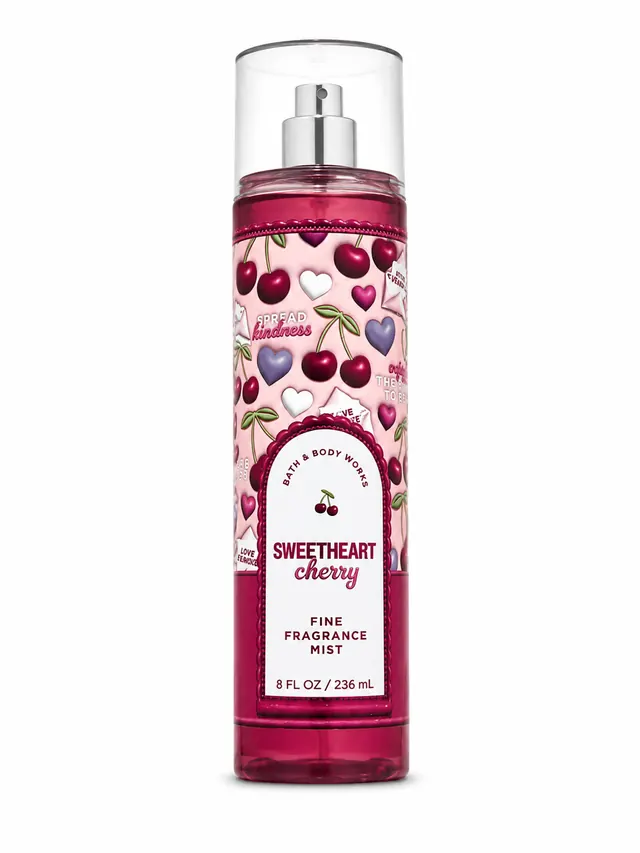
A useful product reference makes important shapes, colors, packaging, logos, labels, and accessories easy to inspect beside the finished clip.
Compare product fidelity, motion quality, final formats, duration, cost, failure handling, and the complete workflow before choosing a tool. The best option is the one that creates usable motion without changing the product a customer will receive.
Direct answer
For ecommerce, choose an AI product video generator that starts from a real product image, supports the final placement format, explains duration and cost before generation, does not charge for failed delivery, and makes it easy to review the complete output against the original product. ProductMagicAI is designed around this workflow, but every generated clip still requires a final accuracy review.
Evidence before claims
This example pairs the product reference image with the complete four-second 9:16 output so ecommerce sellers can inspect the full motion, framing, and product presentation before trying the generator.
Reference
A useful product reference makes important shapes, colors, packaging, logos, labels, and accessories easy to inspect beside the finished clip.
Output
Review the full clip, not only a poster frame. Check product identity, motion, cropping, background artifacts, and the final frame before commercial use.
Evaluation framework
Use the same criteria for every tool. Do not judge a product video only by how cinematic the first frame looks.
What good looks like
The product keeps its recognizable shape, colors, materials, packaging, and visible brand details.
How to verify it
Compare the first, middle, and final frames with the source photo. Reject clips that add, remove, or redesign product details.
What good looks like
Camera movement and product motion feel intentional without warping the item or creating distracting background artifacts.
How to verify it
Watch the clip at normal speed and frame by frame. Check edges, reflections, hands, props, and repeated objects.
What good looks like
The generator supports the aspect ratio required by the intended placement instead of forcing a destructive crop later.
How to verify it
Generate in the final placement format and confirm the product stays inside the safe area on mobile and desktop.
What good looks like
The clip is long enough to communicate the product clearly but short enough for the intended ad or product-page placement.
How to verify it
Check whether the product is visible immediately, the motion completes, and the final frame is usable without abrupt cuts.
What good looks like
The product explains the credit or price cost before generation and clearly states what happens when a render fails.
How to verify it
Review the selected tier, duration, required plan, and successful-delivery charging rule before starting the job.
What good looks like
The tool matches how an ecommerce team actually works: one source image, clear creative goal, review, export, and iteration.
How to verify it
Test the complete path from upload to usable export, including signup, generation status, failure recovery, and download.
Current product facts
These facts reflect the current product interface as reviewed on August 14, 2026. They are disclosed here so the guide can be evaluated against the actual workflow, not a general best-tool claim.
Open AI Video GeneratorTransparent methodology
Use the same source product, intended placement, and review checklist across tools so the comparison is based on output quality and workflow—not different inputs.
Choose the final channel, aspect ratio, duration, and creative goal before generating. This prevents avoidable cropping and pacing problems later.
Upload a sharp image with the full product visible. Keep logos, labels, edges, colors, packaging, and important accessories unobstructed.
Review the opening, middle, and final frames for product drift, motion artifacts, cropping, repeated objects, and background inconsistencies.
Do not publish a clip that changes the item a buyer will receive. Use a clearer source image or a different creative direction and generate again.
These options solve different production problems. Choose based on the asset you need, the input you already have, and the level of control required.
Best for
Ecommerce sellers starting from a real product photo who need short product-focused videos for ads, stores, and social placements.
Main tradeoff
Generated motion and product details still require a final visual review before commercial use.
Best for
Broad visual experimentation when the workflow does not need ecommerce-specific goals, product review guidance, or integrated product creative tools.
Main tradeoff
The user may need to assemble prompting, product checks, copy, formatting, and export steps across multiple tools.
Best for
Teams that already have footage and need exact timeline control, transitions, audio, brand graphics, and frame-level editing.
Main tradeoff
It requires source footage, editing skill, and more production time than generating motion from one product photo.
Best for
Campaigns that require a real person, spoken demonstration, physical product handling, or fully directed live-action footage.
Main tradeoff
Scheduling, shipping, reshoots, usage rights, and per-asset production costs can make iteration slower.
This guide is published by ProductMagicAI, the company that operates the product described on this page. It does not rank named competitors or claim that one tool is best for every use case. The evaluation framework, disclosed product facts, matched product reference image, complete video example, and stated limitations are the basis for the recommendation.
Evaluate product identity, motion quality, final aspect ratios, duration choices, cost transparency, failure handling, and the complete upload-to-export workflow. A visually impressive clip is not useful if the product no longer matches the item being sold.
Yes. ProductMagicAI starts from one product photo and creates a short AI product video for ecommerce placements. The generated clip should be reviewed against the source product before publishing.
The current ProductMagicAI interface offers portrait 9:16 for vertical placements and landscape 16:9 for horizontal placements.
The current interface offers 4-second and 8-second choices. The best duration depends on the placement, creative goal, and how much product information the clip needs to communicate.
AI Credits are charged only when the video is successfully delivered. A failed render should not consume the selected generation credits.
No generative video system should be treated as a guarantee for exact small text or every product detail. Review logos, labels, model numbers, quantities, claims, packaging, and accessories before commercial use.
Not in every case. ProductMagicAI is useful for short product-focused motion from a real product photo. Use UGC or live production when a person must demonstrate the item, and use a manual editor when exact timeline control is required.
ProductMagicAI publishes this guide to explain the criteria ecommerce sellers should verify before choosing or publishing AI-generated product video. Because the publisher also makes the product, readers should evaluate the disclosed product facts and the real output example rather than relying on a best-tool claim alone.
Use the evaluation matrix above, generate a short clip, and compare every important product detail with the original before publishing.
Open AI Video Generator